What is FordPass?
FordPass is a powerful app designed to enhance your driving experience, offering a wide range of features to make managing your Ford vehicle easier and more convenient. Whether you’re looking for remote start capabilities, vehicle diagnostics, or access to exclusive rewards, FordPass integrates seamlessly into your daily routine.
By connecting your smartphone with your Ford vehicle, FordPass allows you to perform a variety of functions directly from the app. It offers everything from remote vehicle control to rewards for regular maintenance, making it an indispensable tool for Ford owners.
What Does FordPass Do?
The capabilities of FordPass extend far beyond just starting your car remotely. Here are some of the key features that make FordPass essential for Ford owners:
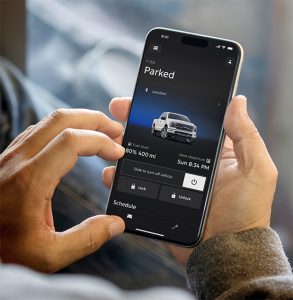
- Remote Start and Locking/Unlocking: One of the most popular features is the remote start function. With the app, you can start your vehicle from the comfort of your home or office, ensuring it’s warm or cool when you’re ready to drive. Additionally, you can lock and unlock your doors from anywhere, which is especially helpful if you forget to lock your car or need to let someone in.
- Vehicle Health Alerts: FordPass monitors your vehicle’s health, alerting you to any issues with tire pressure, oil life, or engine status. This feature ensures that you’re always on top of any necessary maintenance or repair, helping to keep your vehicle in peak condition.
- Trip Tracking: FordPass provides trip tracking, so you can view a detailed history of your driving behavior. This is useful for both personal and business purposes, allowing you to track mileage, fuel consumption, and driving patterns over time.
- Find My Car: If you’ve ever had trouble locating your car in a crowded parking lot, this feature is a real lifesaver. Simply open the app to find your vehicle’s exact location.
- Schedule Service: Through FordPass, you can schedule service appointments directly from the app. This eliminates the need to call and provides a convenient way to book your next oil change or tire rotation.
How to Use FordPass
Using FordPass is straightforward, and setting up the app is simple:
- Download the App: FordPass is available for both iOS and Android devices. Simply go to the App Store or Google Play Store, download the app, and create an account.
- Link Your Ford Vehicle: Once the app is installed, link your Ford vehicle by entering the Vehicle Identification Number (VIN) found on your vehicle. This allows FordPass to sync with your car and unlock all of its features.
- Set Up Features: After linking your vehicle, you can customize your settings. Set up notifications for vehicle health alerts, location tracking, and service reminders.
- Use the App Regularly: Once set up, you can use FordPass to remotely start your vehicle, check the health of your vehicle, or even unlock your doors when you’re on the go.
Remote Start: Convenience at Your Fingertips
One of the standout features of FordPass is its remote start capability. Whether you’re in a cold climate and need to warm up your car or want to cool it down on a hot summer day, the app allows you to start your vehicle from virtually anywhere.
Here’s how it works:
- Open the app and tap the “Remote Start” button.
- You’ll receive a notification when your vehicle has successfully started, ensuring you’re never left waiting in the cold or heat.
- You can also schedule remote start for a specific time, ensuring your car is ready when you are.
Rewards: Earn Points for Service and More
With FordPass, you also have access to the Rewards program. This program lets you earn points for things like scheduled vehicle service, purchasing parts, or even when you use the app regularly.
These points can be redeemed for a variety of rewards, such as:
- Discounts on vehicle maintenance services
- Complimentary vehicle accessories
- Points that can be used for a future vehicle purchase
By using FordPass for your service needs, you not only make maintaining your vehicle easier but also earn rewards for doing so.
Benefits of FordPass for Everyday Use
The convenience and functionality offered by Ford go beyond just remote starting and service scheduling. Here are some of the other benefits to your daily life:
- Enhanced Vehicle Control: The app allows you to control your Ford in ways that simply weren’t possible before. From locking your doors to checking tire pressure, FordPass puts the control in your hands, wherever you are.
- Increased Security: FordPass offers advanced security features, including the ability to monitor your car’s location and receive alerts if your vehicle is being tampered with.
- Access to Fuel Discounts: Many users also enjoy access to fuel discounts through the app. By using participating fuel stations, you can save money every time you fill up your tank.
Is FordPass Available for All Ford Vehicles?
While FordPass is available for most Ford vehicles, it’s important to note that not all vehicles are compatible with every feature. For example, some older models may not support remote start, but they can still benefit from basic functions like vehicle health alerts and service scheduling.
To find out if your vehicle is compatible with FordPass, you can visit the official Ford website or check with your local Ford dealer.
This app is an essential tool for modern Ford owners. With its ability to remotely control your vehicle, track trips, manage your car’s health, and earn rewards, Ford makes it easier than ever to stay on top of your vehicle’s needs. Whether you’re looking for convenience, security, or rewards, Ford offers a comprehensive solution to make your ownership experience more enjoyable and efficient.
At Atchinson Ford, we encourage you to explore all that FordPass has to offer. If you have any questions or need assistance setting up the app, feel free to visit us in Belleville, MI.
Posted in
Belleville Ford Dealer, Ford Services, Ford Technology, FordPass |
No Comments »